🏫 Supply Teaching · Zero Prep · Works in Any Classroom

Walk In. Open the Link. They Ask You to Come Back.

Mr Sharma covers Year 4 on a Wednesday and Year 7 on the same Friday afternoon. He doesn't know either class, doesn't know either teacher's plans, and has never visited either school before. One link. Two sessions. Both classes engaged. Both classes asked if he was coming back.

verified_user No IT request needed · Works on any browser · No student accounts

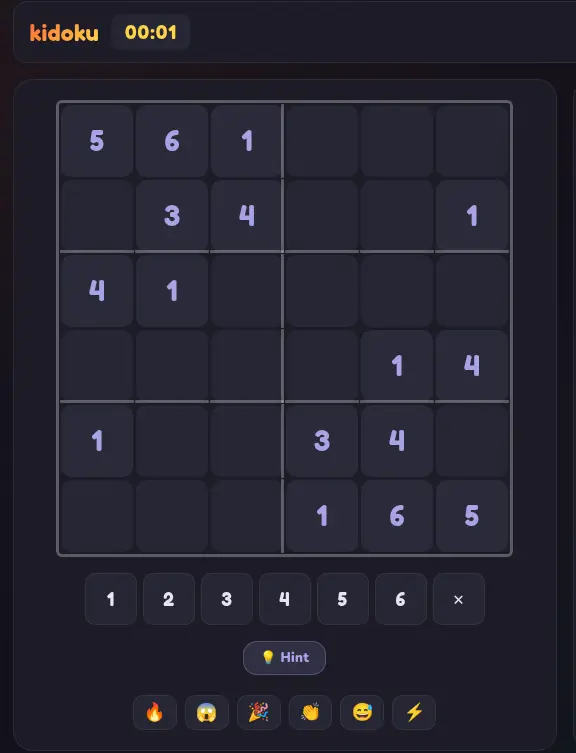
kidoku live screen

Mr Sharma's Supply Kit

🔗

kidoku.app/live

Write on the board. That's it.

⏱️

Setup time

Under 2 minutes

🎓

Curriculum knowledge needed

None

"Can you come back next week?"

"Come back!" 🙋

Wednesday Year 4. Friday Year 7. Same Toolkit. Both Classes Loved It.

Mr Sharma covers around twelve schools a month. The variation is the job: different year groups, different subjects, different rooms, different class cultures. Some days the work plan is detailed. Some days it says "maths activities" and nothing else.

He has a single page of backup activities for when a lesson runs short or the plan falls apart. Kidoku is at the top. He writes the link on the board and says "this is a live puzzle race." That's the extent of the introduction.

Year 4 on the Wednesday worked without him having to explain more than the URL. Students started in pairs, then competitive dynamics took over. By ten minutes in, the room was generating its own energy. Mr Sharma answered questions about the puzzle — not about classroom management.

Friday Year 7 was initially reluctant. Secondary students are harder to crack, and they don't want to appear enthusiastic in front of each other. The first student to beat a classmate's time changed the room temperature. Within four minutes, four separate small competitions had broken out without Mr Sharma initiating any of them.

At the end both days, students asked whether this was something their regular teacher could set up. He sent the link to both form tutors. Both classes came back to it the following week.

For a supply teacher, the goal is a functional, engaged room for the duration. Kidoku doesn't require you to know the class. It creates engagement on its own terms. The game is the curriculum. You're just the person who opened the link.

Walk In. Write the Link. Go.

There's no setup, no IT request, no student accounts. Works on any device with a browser. The game manages itself for the entire session.

✍️

1. Write the URL on the Board

kidoku.app/live. That's all students need to type on any device — phone, iPad, school Chromebook. No download, no login. Anyone with a browser is in within thirty seconds.

🚀

2. The Game Explains Itself

First-time players understand what to do within their first game session. The logic is self-demonstrating — no walkthrough needed from you. You don't need to know sudoku to run the session.

🎮

3. The Class Runs Itself

Once the competition starts, the room generates its own momentum. Students challenge each other, track times, and ask for rematches — without needing you to manage the activity. You circulate and support.

The Backup That Works Every Time

no_backpack

No Curriculum Knowledge Required

Kidoku isn't linked to a specific year group or subject scheme. It's logic puzzle competition. You don't need to know the class's topic, their teacher's scheme, or anything about their prior learning.

devices

Any Device, Any School IT Policy

Browser-based, no download. Works on school Chromebooks, students' phones, classroom iPads. No IT department request, no network special access, no software install required.

groups

Works from Year 2 to Year 11

The 4×4 Animal grid works for primary. The 9×9 Classic is a genuine challenge for secondary. The same game at different complexity scales across the full age range you might cover in any given week.

Mr Sharma's Supply Teacher Checklist

Zero setup — write URL on board

Works on school devices, no install

No curriculum knowledge needed

Class self-manages after 2 minutes

Students ask if you're coming back

Safe for the Classroom on Day One

You're in an unfamiliar school with an unfamiliar class. The last thing you need is a safeguarding question about a tool you introduced. Kidoku is designed to be safe without requiring any configuration from you.

  • check

    No student accounts — auto-generated usernames only. No personal data collected.

  • check

    No chat — no player-to-player messaging inside sessions. Nothing to monitor or moderate.

  • check

    No external links — the game is self-contained. Students cannot navigate away to other content from within it.

Use It in Your Next Cover
🏫

"Can you come back next week?" The best feedback a supply teacher can get.

One link. Any classroom. Any age. The game manages the rest. You manage the room.

FAQ

Frequently Asked Questions

Everything you need to know about Kidoku Live for this use case.

What is the best no-prep activity for a supply teacher?

Kidoku Live is specifically designed for this scenario. Visit kidoku.app/live on your phone or classroom computer, create a room in five seconds, write the code on the board. Students join on their devices — no accounts, no instructions beyond 'solve the puzzle fastest'. The session runs itself. No lesson plan required.

Does a supply teacher need to know how to play sudoku to run this?

No. You do not need to know the rules. The game explains itself to students through the interface. Your role is to create the room and display the code. The competitive live leaderboard manages student engagement from that point. Supply teachers consistently report they use it for every age group they cover, regardless of subject.

What year groups does Kidoku Live work for as a supply activity?

All year groups. Animal Grid 4×4 for Key Stage 1 (ages 5–7). 4×4 and 6×6 Classic for Key Stage 2 (ages 7–11). 6×6 to 9×9 for secondary. The teacher selects the grid size when creating the room, or lets students choose their own difficulty. Even Year 10–11 students engage with 9×9 Classic in a competitive timed format.

What if the classroom doesn't have reliable WiFi?

Kidoku Live works on individual student mobile data if school WiFi is unavailable. The game is data-light — a session uses less than 1MB. Students sharing a mobile hotspot can also connect. The browser-based format means no university WiFi blocklists typically apply to the domain.

Can I use Kidoku Live without any classroom technology?

You need at least one device per student (their phone is sufficient). You need to display the room code — writing it on the board requires no technology. Projecting the teacher leaderboard view enhances the experience but is not required. The minimum setup is: room code on the board, students on phones.

Save the Link. Use It Tomorrow.

Whatever school, whatever year group, whatever's left of the lesson plan — kidoku.app/live is the backup that earns you a return booking.

No setup · No IT request · Works on any school device

The No-Prep Classroom Activity Every Supply Teacher Should Bookmark

Supply teachers face a unique challenge: an unfamiliar class, no prepared lesson, and a room full of children who already know the day is going to be different. Kidoku Live turns that situation around in 30 seconds — write a code on the board, tell students to open a browser, and the class is already playing before you've finished taking the register.

Works for Every Year Group Without Changing a Single Setting

Year 1 through Year 11 can all play in the same session. Younger children select the 4×4 Animal Grid, older students choose 6×6 or 9×9, and every player appears on the same leaderboard regardless of grid size. One activity works for a primary supply and a secondary cover lesson — no adjusting required.

How to Launch a Live Session in Under 60 Seconds

Open kidoku.app/live on the classroom computer or projector. Click 'Create Room'. Display the six-character code on the board or projector. Students visit the same address on their devices, enter the code, and join. The game starts as soon as two or more players are ready. Total setup time: under one minute.

No IT Approval, No Accounts, No Prep

Because Kidoku Live collects no personal data and requires no student accounts, there is nothing for the school's IT policy to object to. There are no plugins to install and no parental consent forms to issue. It runs on school Chromebooks, students' personal phones, and the classroom computers equally well.

Frequently Asked Questions

What year groups does it work for?

Year 1 through Year 11. Grid sizes from 4×4 with animal pictures to 10×10 classic sudoku adapt automatically to ability, so a mixed Year 5/6 class all play together on one leaderboard.

What if students finish early?

Instant rematch. Once the first player finishes, a rematch button appears. The leaderboard resets and a fresh puzzle starts immediately — there is no downtime between rounds.

Is Kidoku Live free?

Yes. The entire game — Quick Match, Grand Prix, private rooms, and all themes — is completely free to play. No subscription is needed to access any feature.

Does it require an account or sign-up?

No account is required. Players join with a 4-letter room code and are assigned a safe auto-generated username for the session. No personal information is collected.

Also see: Free classroom activity for primary teachers · After-school club puzzle session

Related Guides