Miss Sharma had no plan for the last ten minutes on a Wednesday. She put a 6-digit code on the whiteboard. By the time the bell rang, the class was asking to do it again tomorrow.
verified_user No IT approval needed · No accounts · GDPR safe by design
Join the Battle
22 students · Live right now
It was a Wednesday afternoon. Miss Sharma had finished her lesson plan with ten minutes to spare and a room of Year 4 students vibrating off their chairs.
She'd seen Kidoku Live mentioned in a teacher forum the week before. No login, no setup, just a code. She thought: what's the worst that can happen?
She opened kidoku.app/live on the projector. Created a Classroom Room. Got a 6-digit code: 735826. Wrote it on the board.
"Go to kidoku.app/live. Type this code. Pick an animal. Don't tell me your nickname."
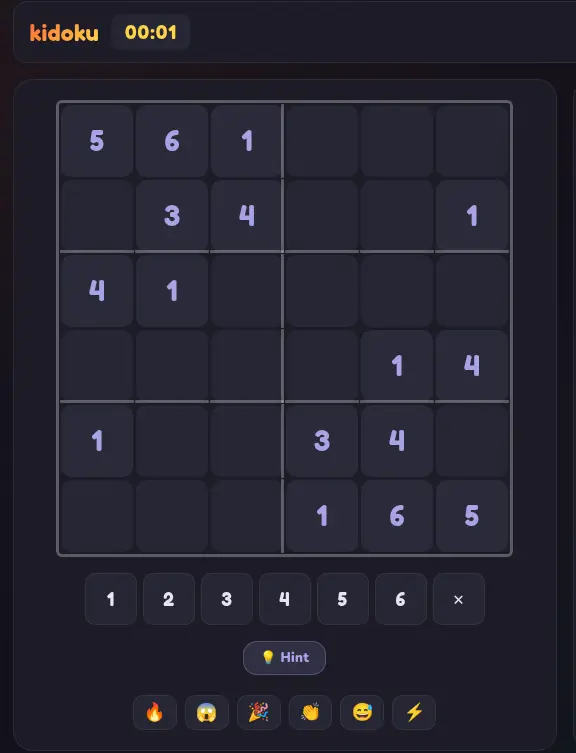
Within 90 seconds, all 22 students were in the room. She selected Animal 4×4. Hit start. Projected the live leaderboard.
The room erupted.
The kid nobody expected to win finished first. The fastest reader came third. The child who always said "I'm bad at maths" came second.
The bell rang. Four students stayed seated. One said: "Miss, can we do that again tomorrow?"
She runs it every Friday now. It takes 8 minutes. It requires zero planning. The children talk about their Grand Prix scores at break time.
Less setup than Kahoot. More engagement than any worksheet.
Go to kidoku.app/live on the classroom projector or interactive board. Click "Create Classroom Room." Get a 6-digit code.
Write the code. Students open any browser, go to kidoku.app/live, enter the code. No email. No account. No IT ticket. Done.
Project the live leaderboard. See the class race in real time. Pause mid-game to discuss strategy. Teacher controls the room — start, pause, end.
No lesson plan. No printed worksheets. No IT support. Just a browser, a code, and 25 children who suddenly want to practice logic.
See all student nicknames. Remove anyone. Pause the game mid-race. Set the start time. You're always in control of what your class sees.
Constraint elimination, pattern recognition, deductive reasoning. The game marks itself. You just watch, pause, and teach.
Teacher Dashboard View
From 10-minute fillers to week-long curriculum units.
Private room, your code, full teacher controls. The perfect 10-minute class activity. Works for Reception through Year 9.
Daily at 4 PM. Send students to the global tournament as homework or an after-school activity. Top 10 go in the Hall of Fame.
Split the class into two teams. Shared grid, strategy + speed. Ideal for collaborative problem-solving lessons.
Before you show anything to your class, you need to know it's safe. Here's exactly what Kidoku Live collects — and doesn't.
Zero personal data — no names, no emails, no IP logging. Designed this way, not retrofitted.
Auto-generated nicknames only — BravePanda8, SwiftTiger5. No real names ever shown.
No chat — students can only send emoji reactions. No text, no voice, no DMs.
No account required — for you or your students. No school email needed.
Teacher controls — see all nicknames, remove players, pause and restart the game at any time.
Join Code
Waiting for 22 students...
kidoku.app/live
The Kahoot moment — but the skill built is logic, not trivia recall.
| Feature | Kidoku Live | Kahoot / Worksheets |
|---|---|---|
| Real-Time Classroom Race | check_circle | check_circle |
| Builds Logic Skills | check_circle | cancel |
| No Account for Students | check_circle | cancel |
| Zero Personal Data | check_circle | cancel |
| Works at Any Difficulty Level | check_circle | cancel |
| Teacher Room Controls | check_circle | check_circle |
| Works Without Pre-Planning | check_circle | cancel |
Everything you need to know about Kidoku Live for this use case.
Kidoku Live is a leading Kahoot alternative for maths and logic. Instead of recall quizzes, it runs live multiplayer sudoku — students race to solve the same puzzle simultaneously. It requires no account, no IT setup, and works on any device including Chromebooks and tablets. One room code on the board starts a class in under 60 seconds.
Visit kidoku.app/live, create a classroom room, and note the 6-digit code. Write or display the code for students. Each student opens kidoku.app/live on their device and enters the code — no account or login needed. The session starts immediately and the live leaderboard updates on the teacher's screen as students complete the puzzle.
Yes. Kidoku Live is browser-based and requires no installation. It works on any device with a modern browser including Chromebooks, iPads, Windows laptops, and phones. No IT department approval or app installation is needed before first use.
A typical 4×4 Animal Grid session takes 3–8 minutes. A 6×6 Classic takes 6–15 minutes. The teacher chooses the grid size to match available time and student age. A 10-minute end-of-lesson activity works perfectly with a 4×4 or 6×6 session, including time to discuss results.
Yes. Kidoku Live collects zero personal data from students — no names, no emails, no accounts. Usernames are auto-generated. There is no chat feature. This design makes it COPPA compliant and GDPR-safe by architecture, with no DPO review typically required before classroom deployment.
The live leaderboard shows all student positions in real time. The teacher can see who finishes early (fast finishers who need extension) and who is taking longer (students who may need support). The session results provide an informal engagement snapshot without any formal student data being retained.
Yes — it is ideal. Logic-based bell ringers are effective at focusing attention at the start of a lesson. A 4×4 session takes 5 minutes and produces a class leaderboard that generates immediate discussion. Teachers report that 'bell ringer sudoku' becomes something students look forward to and arrive on time for.
Worksheets are solo and unverified. Kidoku Live is competitive, social, real-time, and self-checking — the system tells a student immediately when a placement is wrong. The live leaderboard creates stakes that no worksheet can replicate. Students who refuse to do worksheets often engage eagerly with a timed competitive session.
10 minutes. One code. 22 students learning constraint logic without knowing it. Start right now — no planning needed.
Used by primary teachers · Zero IT setup · GDPR safe